
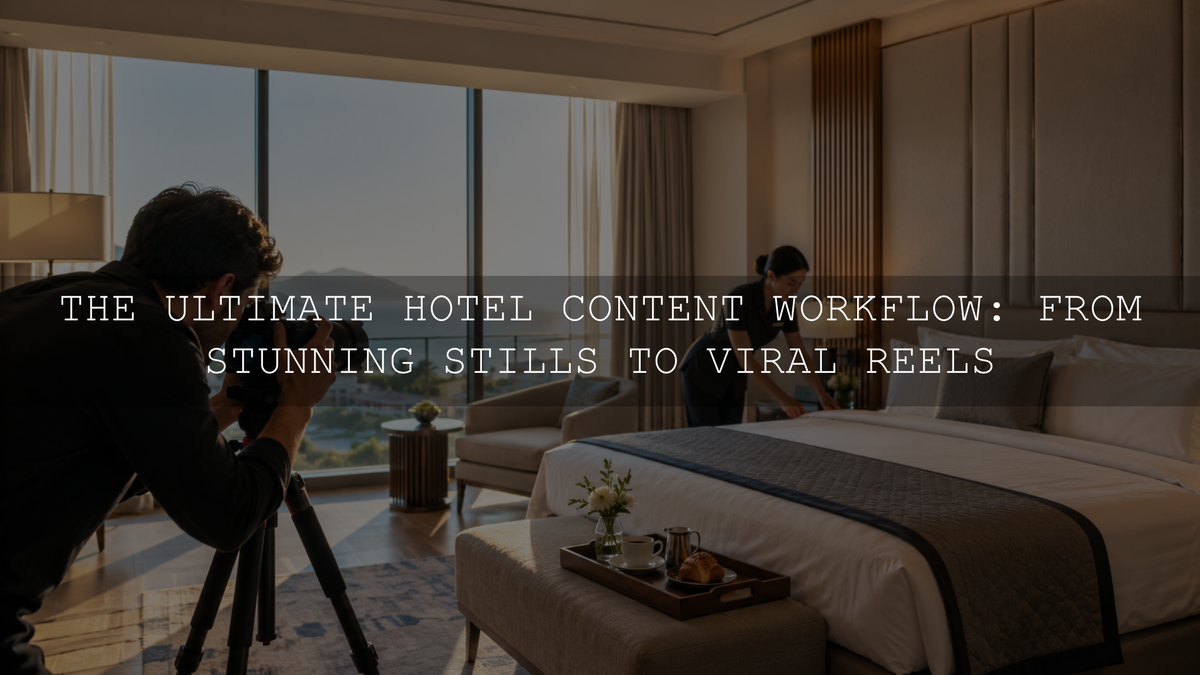
A reliable hotel content creation workflow begins with the questions a potential guest needs answered, not with a camera, editing preset or social media trend. Plan the required website, booking, Google, social and email assets before production, capture several useful formats during the same session, create an approved master edit for each lighting setup and export separate versions for every destination.
This approach helps a hotel build a useful content library instead of collecting disconnected room photographs, short clips and promotional graphics that cannot be reused. The objective is to show the property accurately while giving each asset a specific role in the guest’s booking journey.
Hotel Content Workflow at a Glance
- List the guest questions the content must answer.
- Identify every website, booking, Google, social and campaign deliverable.
- Create a shot matrix covering rooms, amenities, service, food, atmosphere and location.
- Prepare the property and schedule each area for its most suitable light.
- Capture horizontal photographs, vertical video, details and human interactions during the same session.
- Create one technically accurate master edit for each lighting setup.
- Apply a consistent visual direction to related photographs and footage.
- Export and organize separate files for each channel.
- Audit published content when rooms, amenities, menus, policies or seasonal experiences change.
Start With the Guest’s Decision Journey
A hotel gallery should do more than make the property look attractive. It should help a guest understand where they will sleep, what is included, how the property feels and whether the experience suits the purpose of the trip.
Organize the content plan around four stages.
Discovery
Discovery content creates the first impression. It may include an exterior at the most flattering time of day, a signature lobby view, a memorable pool, a rooftop scene, a destination view or a distinctive architectural feature.
These photographs and clips should communicate the property category and atmosphere quickly without hiding what the guest is actually viewing.
Comparison
Comparison content helps the guest evaluate room categories, bed configurations, bathrooms, views, workspaces, accessibility features, family facilities and amenities.
Do not rely only on dramatic wide-angle photographs. Include straightforward images that show the complete room layout, usable floor space, bathroom design, storage, seating and the relationship between important areas.
Trust
Trust content shows the real experience behind the polished presentation. Useful examples include staff preparing a room, breakfast being served, a concierge assisting a guest, housekeeping details, maintenance standards, local products and genuine behind-the-scenes processes.
Human interaction should feel believable. Avoid staging service moments that the hotel does not normally provide.
Booking
Booking content removes final uncertainty. It includes accurate room labels, current amenity information, clear package details, verified location information, recent guest feedback and visible calls to check availability.
The visual promise, written description and actual booking option should agree. A photograph of one suite should not be used to represent every room category when layouts or views differ substantially.
Build a Hotel Shot Matrix
A normal shot list identifies what must be photographed. A shot matrix also records the purpose, room category, orientation, lighting condition, people required and intended channel.
Create a separate row for every important property area and include the following asset groups where relevant:
- Arrival: Exterior, entrance, driveway, signage, reception and first lobby view.
- Rooms: Every bookable room category, bed configuration, bathroom, seating area, storage, work area and view.
- Amenities: Pool, spa, gym, business facilities, event spaces, children’s areas and transportation services.
- Food and drink: Breakfast, restaurant, bar, room service, signature dishes and coffee service.
- Service: Check-in, luggage assistance, housekeeping, dining service, spa preparation and guest support.
- Details: Linens, toiletries, room controls, local products, welcome items, menus and design finishes.
- Location: Nearby streets, beaches, attractions, transport connections and genuine walking routes.
- Seasonal experiences: Holiday décor, events, outdoor dining, monsoon or winter atmosphere and temporary packages.
Assign a job to every image. A wide room photograph may explain the layout, while a close detail may support a social story or reinforce the quality of a booking page. Capturing several images without assigning their purpose often produces unnecessary duplicates while important information remains missing.
Prepare the Property Before Production
Cleaning and styling decisions affect the entire content library. Complete operational checks before the photographer or content team begins working.
- Remove temporary maintenance equipment, unused signage and unrelated cables.
- Check lamps, curtains, televisions, room controls and visible appliances.
- Steam linens and align furniture without making the room look artificially perfect.
- Confirm that toiletries, minibar items, menus and welcome amenities match the current guest experience.
- Choose realistic food portions and room-service arrangements.
- Verify uniforms and obtain appropriate permission from identifiable staff or models.
- Check mirrors, glass, chrome and glossy surfaces for fingerprints and unwanted reflections.
Schedule areas according to their lighting rather than trying to photograph the entire property in room-number order. An east-facing room may be strongest in the morning, while the pool, rooftop or exterior may need late-afternoon or evening light.
Capture Professional Hotel Photography
Photograph Proof as Well as Atmosphere
A hotel needs both emotional lifestyle images and clear documentary images. The lifestyle photographs create desire, while the documentary photographs answer practical questions.
For each important room category, capture:
- A clear entrance-facing view of the overall room.
- A second angle showing the bed, seating and circulation space.
- The bathroom and shower or bath configuration.
- The actual view available from that room category.
- Storage, workspace, balcony and accessibility features where relevant.
- Several close details that support the property’s design or service promise.
Use wide lenses carefully. Excessively stretched corners, distorted furniture and unrealistic room dimensions may create the wrong expectation. Keep vertical architectural lines controlled and compare the photograph with the real space before approving it.
Manage Windows and Interior Lighting
Hotel rooms frequently combine bright exterior windows, warm lamps, cool daylight and several types of LED lighting. One global white-balance adjustment may not correct every part of the image.
Create a dependable base by checking:
- Window highlight detail.
- Brightness of the bed, seating and main guest area.
- Color casts on white linens and walls.
- Mixed green, magenta, blue or orange light.
- Shadow detail under furniture and inside dark corners.
- Skin tones when staff or models appear.
Use masks when a window, lamp or part of the room needs separate refinement. Avoid pushing every white surface to pure white, because this can remove texture from linens, curtains, tiles and painted walls.
Capture Several Useful Compositions
Do not expect one landscape photograph to work everywhere. Capture selected setups in:
- Wide horizontal compositions for website banners and booking pages.
- Standard horizontal compositions for galleries and email.
- Vertical compositions for Stories, Reels, TikTok and Pinterest.
- Square-friendly compositions for social feeds and profile media.
- Text-safe compositions with uncluttered negative space.
- Tight detail photographs for carousels and supporting content.
Leave enough space around important subjects. A room, person or plate framed tightly for one layout may not survive a different crop.
Capture Short-Form Hotel Video During the Same Session
Short-form video should reveal movement, sequence and service that cannot be communicated fully through still photographs. It does not need to imitate every current trend.
For each important scene, record a simple sequence:
- A wide establishing clip.
- A medium clip showing the primary action or area.
- A close detail such as a key card, coffee pour, pillow placement or plated dish.
- A human interaction or movement through the space.
- A clean closing clip suitable for a transition or call to action.
Begin recording before the action starts and continue briefly after it ends. These clean handles make trimming and transitions easier.
Capture dedicated vertical footage instead of relying entirely on a crop from a horizontal video. A central crop can remove a second person, a room feature, a plate or the environmental context that explains the experience.
Useful hotel video subjects include:
- Arrival from the entrance to reception.
- A room-reveal sequence.
- The route from a room to the pool, restaurant or beach.
- Breakfast or signature-dish preparation.
- Housekeeping or turndown preparation.
- Spa, fitness or event-space details.
- Morning, afternoon and evening atmosphere.
- Local recommendations from a staff member.
Record natural sound where it adds information, such as waves, coffee preparation, a door opening or kitchen activity. Confirm music and sound-effect licensing before using audio in advertising or commercial campaigns.
Create an Accurate Master Edit Before Adding Style
Do not begin by applying the strongest preset or LUT. First create a technically believable version of the room, food, staff member or exterior.
Build a Reference Photograph for Each Lighting Setup
- Select one representative image.
- Choose an appropriate profile.
- Correct lens distortion and perspective.
- Set a believable white balance.
- Balance exposure, highlights, shadows, whites and blacks.
- Correct distracting mixed-light color casts.
- Protect accurate wall, linen, furniture, food and skin colors.
- Apply the approved creative style.
- Compare the result with the property’s real appearance.
After approving the reference, copy suitable adjustments to photographs captured under comparable conditions. Lightroom Classic supports copying selected edit settings and applying them to multiple photographs. Review exposure, white balance, crop, perspective and masks individually instead of assuming every synchronized setting is suitable.
The AI-Optimized Interior Design & Real Estate Lightroom Presets provide eight XMP and eight DNG preset files for Lightroom Mobile, Lightroom desktop, Lightroom Classic and Adobe Camera Raw. They can provide an adjustable starting point for rooms and interior spaces, but each lighting setup still requires exposure, white-balance and perspective checks.
Normalize Video Before Applying a Creative LUT
Confirm how the editing software is interpreting standard, Log, RAW or HDR footage before adding a creative color treatment. In Premiere, color management controls how supported source media is interpreted and processed for monitoring and export.
Correct important exposure and white-balance differences at the clip level. Then apply a shared creative direction to related clips and compare representative video frames with the approved hotel photographs.
The Real Estate LUTs Pack includes eight .cube LUTs for property interiors, exteriors, walkthroughs and promotional footage. The files are compatible with Premiere Pro, DaVinci Resolve, Final Cut Pro, After Effects, Sony Vegas and other software supporting .cube LUTs. Use them after the footage has a reliable technical base and adjust the result for each scene.
Match the Visible Characteristics
A Lightroom preset and a video LUT do not control every adjustment in the same way. Aim to connect the visible result rather than copying identical numbers.
Compare:
- Highlight temperature.
- Shadow color.
- Overall brightness.
- Contrast and black-point depth.
- Saturation.
- Skin tones.
- White linens and neutral walls.
- Signature property colors.
- The appearance of food, greenery, water and sky.
One preset or LUT can produce different results under daylight, warm lamps, mixed LEDs, golden-hour light and nighttime conditions. Group files by scene and lighting setup instead of applying identical settings across the entire property.
Create Separate Content Packages for Each Channel
Hotel Website and Booking Pages
Website and booking media should prioritize clarity, relevance and accuracy. Show the exact room category near its description and include enough views to explain the layout.
A useful room gallery may include:
- The strongest complete room view.
- A second angle explaining space and furniture.
- The bathroom.
- The view or balcony.
- The workspace, storage or seating.
- A lifestyle image showing how the room may be used.
- An accurate amenity or detail image.
Keep current booking information as readable page text rather than embedding all important details inside photographs.
Google Business Profile
Choose recent photographs that represent the hotel as it currently operates. Include the exterior, entrance, lobby, rooms, amenities, food and recognizable guest areas.
Google advises businesses to use media that is focused, well lit and representative of reality without excessive alterations. Review the current Google Business Profile photo and video guidance before preparing final uploads because media requirements can change.
Social Media
Social content can emphasize stories, processes and atmosphere more strongly than a booking gallery. Give every post one clear purpose.
- Discovery: A signature view, room reveal or destination moment.
- Education: Room differences, local tips, transportation or amenity explanations.
- Trust: Staff processes, preparation and behind-the-scenes details.
- Experience: Breakfast, spa, pool, events, sunsets and neighborhood activities.
- Conversion: Availability reminders, package explanations and booking-page directions.
Avoid publishing several nearly identical room tours simply because the files are available. Change the message, perspective, subject or format so each post contributes something new.
Email and Promotional Campaigns
Use clean master files to create separate campaign versions. A promotional headline or temporary price placed permanently over the only copy of an image will limit future reuse.
Keep text-free masters and create campaign graphics as separate exports. Verify dates, inclusions, restrictions and room availability before distributing time-sensitive content.
Write Booking Copy That Supports the Visuals
Room descriptions should combine an emotional benefit with specific evidence. Avoid replacing clear information with vague luxury language.
For example, instead of describing a room only as a spacious sanctuary, explain the bed configuration, approximate size when verified, seating, workspace, view, bathroom arrangement and who the room is best suited for.
Local information should also be checked. Do not write that an attraction is a five-minute walk unless the route and timing are accurate under normal conditions.
For website images:
- Use descriptive file names such as boutique-hotel-deluxe-king-room-city-view.jpg.
- Write concise alt text that describes what is genuinely visible.
- Avoid repeating the same keyword-heavy alt text across every room image.
- Place images beside relevant room or amenity information.
- Keep the final files sharp while controlling unnecessary file size.
Google’s image SEO guidance recommends useful contextual alt text and high-quality, accessible images rather than keyword stuffing.
Build a Permission-First Guest Content Workflow
Guest photographs and videos can add an authentic perspective, but the hotel should obtain appropriate permission before republishing them in marketing.
Record:
- Who created the content.
- Where it was originally published.
- What channels the hotel may use it on.
- Whether paid advertising is included.
- Whether credit is required.
- How long the permission lasts.
- Whether identifiable people have agreed to the use.
Correct technical problems carefully. Avoid changing the room, view, amenity or experience so significantly that the guest-generated content no longer represents reality.
Organize the Hotel Content Library
A clear folder system allows marketing, reservations, management and external agencies to find the correct approved files.
- 01 Originals
- 02 Selects
- 03 Master Photo Edits
- 04 Master Video Edits
- 05 Website and Booking
- 06 Google Business Profile
- 07 Social Media
- 08 Email and Advertising
- 09 Seasonal Content
- 10 Guest Content and Permissions
- 11 Archive
Use file names that identify the property area, room category, scene, orientation and version. For example:
deluxe-king-room-window-view-website-v02.jpg
Keep an approval record so outdated or rejected files are not accidentally republished.
Create a Sustainable Publishing and Audit Schedule
A large production session can provide an evergreen foundation, but it cannot replace every future update. Seasonal events, renovated rooms, changed menus, new staff experiences and temporary packages require fresh content.
A practical schedule may include:
- Monthly accuracy review: Check prices, room descriptions, menus, opening times and active packages.
- Quarterly content review: Identify missing room, amenity, staff and seasonal assets.
- Before every campaign: Verify every claim, date, photograph, booking link and included benefit.
- After operational changes: Replace outdated media immediately when a room, restaurant, pool, uniform or guest service changes materially.
Review performance by content purpose. A high-view social video may be useful for discovery, while a clear room gallery may be more important during booking. Do not judge every asset using the same metric.
Common Hotel Content Workflow Mistakes
- Photographing only the most attractive room: Every bookable category needs accurate supporting media.
- Using one room image for several categories: This can create incorrect expectations.
- Shooting only wide angles: Details, scale, views and service moments are also needed.
- Capturing only horizontal media: Vertical channels require dedicated compositions.
- Over-editing interiors: Unrealistic colors, stretched rooms and replaced views can reduce trust.
- Applying one preset to every lighting condition: Daylight, warm interiors, restaurants and evening exteriors require separate refinement.
- Using a LUT before correcting footage: Creative styling does not replace correct input interpretation, exposure or white balance.
- Publishing outdated amenities: Remove or replace content when the guest experience changes.
- Using guest media without clear permission: Record the approved use before republishing.
- Storing everything in one folder: Separate originals, masters, approved exports and temporary campaign files.
- Following trends without a booking purpose: A popular format is not automatically useful to the guest.
- Measuring every asset by likes: Website clarity, booking engagement and guest questions may reveal different value.
Final Hotel Content Checklist
- List the guest questions the content must answer.
- Document every room category and important amenity.
- Create a shot matrix with purpose, orientation and destination.
- Schedule each property area for appropriate lighting.
- Prepare rooms, public spaces, staff and food accurately.
- Capture wide, medium, detail, horizontal and vertical assets.
- Record service interactions and simple movement sequences.
- Create a neutral master edit for every lighting setup.
- Apply the approved visual style only after technical correction.
- Match photo and video brightness, color, contrast and skin tones.
- Export separate files for booking, Google, social, email and advertising.
- Use descriptive file names and accurate alt text.
- Record permission for guest and staff content.
- Archive outdated files and maintain an approval record.
- Audit published content after operational or seasonal changes.
Frequently Asked Questions
How Often Should a Hotel Create New Content?
Maintain an evergreen library of accurate room, amenity, exterior and service assets, then add fresh content whenever the property, season, menu, package or guest experience changes. A quarterly review can identify gaps, but significant operational changes should trigger an immediate update.
Should a Hotel Prioritize Photography or Video?
Both serve different purposes. Clear photographs are essential for room comparison and booking pages. Video is useful for movement, atmosphere, service and spatial orientation. Capture both during the same prepared setup whenever practical.
Can One Preset Be Used Across an Entire Hotel Shoot?
One primary style can connect the property’s content, but daylight rooms, warm restaurants, pools and evening exteriors may need different exposure, white-balance and preset-strength adjustments. Group photographs by lighting setup and refine each group separately.
Can a Lightroom Preset and Video LUT Create an Identical Look?
Not exactly. Lightroom presets and .cube LUTs control different properties. Aim to match visible brightness, contrast, highlight temperature, shadow color, saturation and skin tones rather than expecting identical settings.
Create a Content System That Supports the Guest
A useful hotel content workflow connects planning, production, editing, publishing and operational accuracy. Start with the guest’s questions, capture each area for several real purposes, create an approved technical and creative reference, and distribute channel-specific versions from organized master files.
Presets and LUTs can make the visual direction easier to repeat, but they should remain adjustable starting points. For qualifying editing products, explore the Buy 3, Get 9 FREE collection, add 12 eligible items to the cart and pay for three.
Written by Asanka — creator of AAAPresets, serving more than 10,000 customers.

Leave a comment
This site is protected by hCaptcha and the hCaptcha Privacy Policy and Terms of Service apply.