
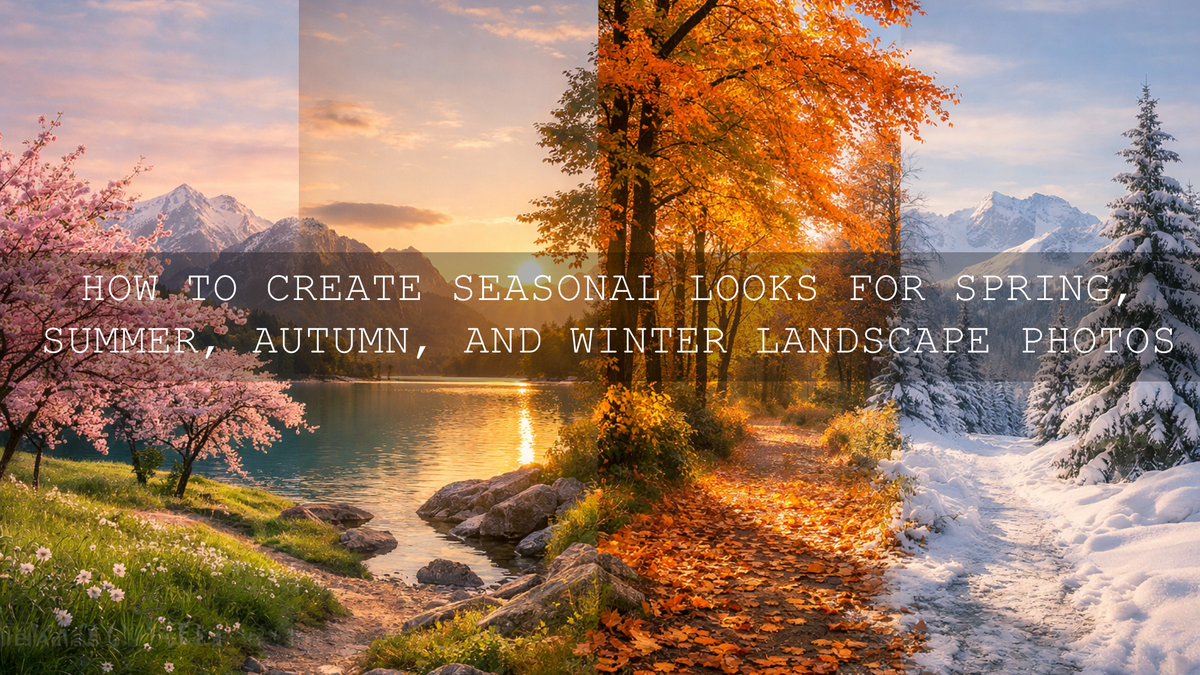
How to Create Seasonal Looks for Spring, Summer, Autumn, and Winter Landscape Photos
Seasonal landscape photo editing works best when you stop treating every image the same way. Spring landscape photo editing needs freshness and soft color harmony. Summer landscape photo editing usually needs warmth, depth, and better highlight control. Autumn landscape photo editing benefits from richer earth tones and cleaner separation between reds, oranges, and greens. Winter landscape photo editing needs careful handling of whites, cool tones, and atmosphere. When you edit each season with its own mood in mind, your landscapes feel more believable, more emotional, and far more memorable.
I have found that the fastest way to build a consistent seasonal style is to start with a strong base and then refine it. If you want an easier starting point, try the AI-Optimized Spring Bloom Lightroom Presets and browse the Professional Lightroom Presets for Landscape Photography collection. It gives you a practical way to move faster while still keeping control, and it fits naturally with the offer: Buy 3, Get 9 FREE.
The real goal is not to force a heavy look onto every photo. It is to make each image feel like the season you experienced when you took it. Here’s why this matters: viewers respond to mood before they analyze technique. If your spring frame feels airy, your summer frame feels alive, your autumn frame feels cinematic, and your winter frame feels crisp or quiet, the edit is doing its job.
A Repeatable Seasonal Editing Workflow
Before breaking down each season, it helps to use one repeatable workflow. This is the process I keep returning to when I want fast edits that still look intentional.
- Fix white balance first. Seasonal color falls apart quickly when temperature and tint are wrong. Adobe’s tutorial on adjusting photo lighting and color in Lightroom is a good reminder that strong edits usually start with clean tone and color control.
- Balance exposure before adding style. Open shadows only as much as the scene needs. Pull back highlights so clouds, snow, and bright leaves keep texture.
- Refine the key colors of the season. In spring that may be greens and pinks. In summer it may be yellows, aqua, and blue. In autumn it is often orange, yellow, and green separation. In winter it is white, blue, and gray control. Adobe’s guide to tone and color work in Lightroom Classic and the Adobe Color wheel are both useful when you want better harmony instead of random saturation boosts.
- Use local masks to shape depth. Sky, foreground, trees, snow, and paths often need different treatment. Adobe’s guide to masking in Lightroom Classic is especially useful for landscape edits where you want selective control without flattening the whole frame.
- Apply a preset as a starting point, not the final answer. The preset should save time and set direction. You still want to fine-tune exposure, white balance, masking, and color mix for the exact light in your image.
- Check the image at full frame and close zoom. Seasonal edits can look great from a distance but fall apart when leaves become neon, snow turns gray, or skies clip too hard.
Let’s break it down season by season.
Spring Landscape Photo Editing for Freshness, Bloom, and Soft Light
Spring landscapes usually feel best when they stay light, clean, and gently vibrant. The danger is pushing too hard and turning flowers overly pink or greens too electric. What usually works better is small, careful movement: slightly warmer white balance, softer contrast, brighter midtones, and gentler saturation in the yellow and green channels.
When I edit spring scenes, I usually start by lifting exposure a little, softening harsh blacks, and checking whether the greens need more luminance rather than more saturation. That keeps foliage feeling alive without becoming artificial. I tested this kind of workflow on blossom-heavy outdoor shots, and the strongest edits were the ones that kept highlight detail in petals and used subtle color shaping instead of dramatic global contrast.
The AI-Optimized Spring Bloom Lightroom Presets work especially well for this because they build a bright, airy base without crushing delicate color transitions. They are a good fit for gardens, flowering trees, countryside walks, and fresh green landscapes where you want polish without losing the softness that makes spring feel like spring.
A few spring editing tips that consistently help:
- Protect highlight detail in petals and clouds. Spring often has bright but gentle light, and clipped whites remove that softness fast.
- Shift green hue before increasing green saturation. Cleaner greens often come from hue and luminance balance, not stronger color.
- Use light masking on paths, flowers, or foreground edges. That helps create direction without making the whole image feel over-processed.
If you want more ideas for spring and warm-season editing, the internal reads on the best Lightroom presets for April photography and editing sunrise and sunset landscape photos are both useful next steps.
Summer Landscape Photo Editing for Warmth, Energy, and Depth
Summer landscape photo editing is often less about adding color and more about controlling what is already there. Summer scenes can have strong greens, intense blue skies, reflective water, and very bright sun. If you only increase vibrance, the image can become harsh and messy. A stronger workflow is to control highlights first, deepen the midtones slightly, and then guide the warmth so the scene feels rich instead of yellow.
On summer landscapes, I usually ask three questions before I touch a preset. Is the light golden, neutral, or harsh midday? Are the greens too dominant? Does the sky need deeper tone, or does it just need better highlight recovery? Those answers change the entire result. Warm summer edits work best when you preserve the feeling of heat and brightness while still leaving room for texture in the sky, grass, and water.
If your summer work leans toward coastlines, travel, or brighter open-air scenes, the Bright Summer Lightroom Presets collection is a helpful browsing point. It can also help to study other warm-weather workflows like the best presets for coastal and beach travel, especially when you want cleaner warm sand and better blue separation.
Here is what usually improves summer images the fastest:
- Reduce highlight intensity before boosting color. That keeps bright summer light from washing out the frame.
- Deepen blue and aqua carefully. Too much can make skies and water look fake.
- Add contrast with masks, not only global sliders. Selective darkening in the sky or foreground gives more depth than heavy overall contrast.
- Watch yellows in dry grass and sunlit leaves. They can become muddy if temperature and saturation are both pushed too far.
Summer edits should feel open, energetic, and alive. The best ones usually look easy, even though the control behind them is quite deliberate.
Autumn Landscape Photo Editing for Rich Color Without Muddy Leaves
Autumn is one of the easiest seasons to over-edit. Because the color is already dramatic, photographers often push oranges, reds, and contrast too far, which can make foliage look muddy, overly orange, or strangely fluorescent. Strong autumn landscape photo editing keeps the warmth, but also protects realism.
The Fall Lightroom Presets For Autumn Photos are a strong choice when you want clean seasonal warmth, realistic foliage, and a polished result that still feels natural. If you want a more artistic direction, the AI-Optimized Matte Autumn Film Lightroom Presets give you a softer cinematic finish with a more stylized film mood.
In my own autumn edits, I usually work on orange and yellow balance before I touch red. That keeps the image from tipping into a heavy, oversaturated fall look too early. On misty forest scenes, I also avoid lifting shadows too aggressively because the mood often lives in those darker midtones.
A better autumn workflow looks like this:
- Neutralize white balance so the warmth comes from the scene, not from a random color cast.
- Adjust orange and yellow luminance to keep leaves bright and readable.
- Use masks on paths, trees, fog, or distant hills for depth.
- Add color contrast between warm foliage and cooler shadows.
- Only then decide whether you want a clean autumn look or a matte cinematic look.
If your autumn scenes include fog, muted woods, or green-heavy locations, you may also find these guides useful: editing fog and mist in autumn landscapes and how to edit forest photos without unnatural green leaves.
Winter Landscape Photo Editing for Clean Snow, Cool Tones, and Atmosphere
Winter landscape photo editing is all about control. Snow can turn gray, blue, or flat very quickly. Low-contrast scenes can feel lifeless, while over-corrected winter edits can lose the calm and stillness that make the season beautiful in the first place. The goal is not simply to brighten everything. It is to keep the whites clean, recover texture, and shape atmosphere without destroying the cold mood.
The AI-Optimized Winter Snow Landscape Lightroom Presets are especially useful when your images need cleaner snow, better separation in the sky and ground, and a more polished winter finish. For broader browsing after that, the Winter Lightroom Presets For Mobile and Desktop collection is a strong next stop.
What helps most in winter:
- Raise whites carefully, not blindly. Clean snow should still hold detail and shape.
- Correct blue casts in shade without removing all cool tones. Winter should still feel cold.
- Use local masks on sky, snow, and trees separately. Winter scenes often need selective balance, not one global move.
- Add texture only where the scene needs it. Frost, branches, and footprints benefit from detail, but skies and soft snowbanks do not need aggressive clarity.
If you want extra winter-specific ideas, this snow sparkle editing guide is a helpful related read for bringing back brightness and texture without making the scene look crunchy.
Presets vs Manual Editing for Seasonal Looks
This comparison matters because many photographers feel they have to choose one approach or the other. In reality, the smartest workflow usually combines both.
- Presets are best for speed and consistency. They give you a strong starting direction, especially if you are editing a full landscape set from the same trip or season.
- Manual editing is best for precision. It helps you adapt to unusual light, mixed weather, or specific color problems in a single image.
- The best workflow is preset first, manual second. Start with a look that matches the season, then refine white balance, masks, and color channels until the scene feels true to your memory.
I rarely leave a preset untouched. Even a very strong seasonal preset usually needs a small exposure adjustment, one white balance correction, or a better sky mask. That is what makes the result feel finished rather than one-click generic.
How to Keep Seasonal Editing Consistent Across a Full Gallery
If you are editing a travel set, a landscape series, or content for your portfolio, consistency matters just as much as individual image quality. Here is what helps:
- Choose one seasonal direction before you begin editing the full set.
- Sync only the edits that should stay common, such as basic tone, color mix, and profile direction.
- Adjust local masks image by image, because light placement changes from frame to frame.
- Compare images side by side to make sure one photo is not dramatically warmer, darker, or more saturated than the rest without a creative reason.
If you want an all-season shortcut for building that consistency, you can explore the wider AI-Optimized Lightroom Presets For Mobile and Desktop collection alongside the seasonal packs above. It is a practical way to keep your workflow moving while still matching the mood of each time of year.
Related Reading
- How to edit sunrise and sunset landscape photos
- Best Lightroom presets for April photography
- Best Lightroom presets for coastal and beach travel
- How to edit fog and mist in autumn landscapes
- How to make snow sparkle in winter photography
If you want to turn seasonal ideas into faster real-world edits, start with the AI-Optimized Spring Bloom Lightroom Presets, the Fall Lightroom Presets For Autumn Photos, or the AI-Optimized Winter Snow Landscape Lightroom Presets. Pair them with the Professional Lightroom Presets for Landscape Photography collection and you can build a stronger editing workflow for every season while taking advantage of Buy 3, Get 9 FREE.
FAQ
What is the best way to edit landscape photos for different seasons?
The best approach is to edit for the mood of the season rather than applying the same formula to every image. Spring usually needs softer color and light, summer needs highlight control and depth, autumn needs clean warm tones, and winter needs careful snow and cool-tone balance.
Should I use seasonal presets or edit everything manually?
Use both. Seasonal presets are excellent for speed and consistency, while manual adjustments help you correct white balance, local contrast, and color issues unique to each photo.
Why do my autumn leaves or spring greens look fake after editing?
This usually happens when saturation is pushed too far before hue, luminance, and white balance are corrected. Cleaner seasonal edits usually come from smaller color refinements, not stronger global vibrance.
How do I keep winter snow bright without losing detail?
Raise whites and exposure gradually, then recover highlights and check the histogram. Local masking also helps because sky, snow, and trees often need different treatment in the same frame.
Can Lightroom presets work on both mobile and desktop?
Yes. Many AAAPresets seasonal packs include DNG and XMP formats, which makes them useful across Lightroom Mobile, Lightroom Desktop, Lightroom Classic, and Adobe Camera Raw workflows.
Written by Asanka — creator of AAAPresets (10,000+ customers).


Leave a comment
This site is protected by hCaptcha and the hCaptcha Privacy Policy and Terms of Service apply.