
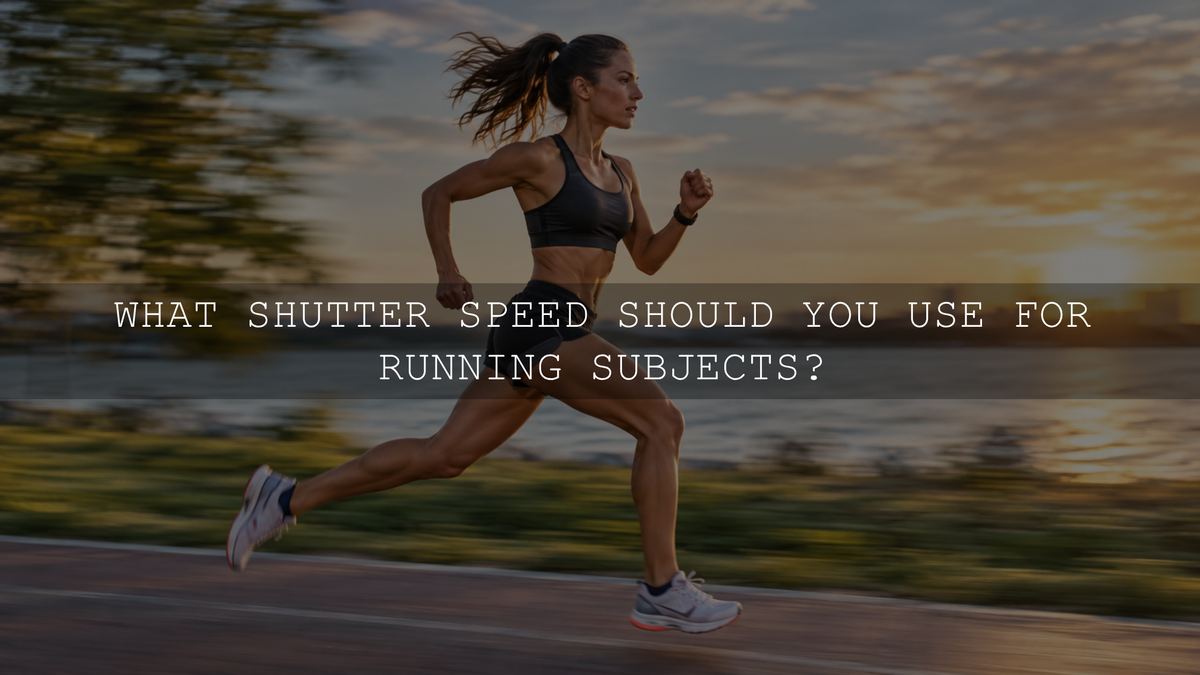
For most running photography, start at 1/1000 second to freeze the action. A moderate jogger may look sharp at 1/500 second, while a sprinter crossing close to your camera may need 1/1600 to 1/2000 second or faster, especially if you want crisp hands and shoes. For a more dynamic photograph, try panning at around 1/125 second, then experiment with 1/60 second to create stronger background blur.
These are starting points, not guaranteed settings. The right shutter speed depends on how fast the runner moves across your frame, shooting distance, focal length, available light, and whether your goal is a completely frozen subject or visible motion. This guide shows how to choose, focus, and adjust those settings on the track or during an everyday run.
Best Shutter Speed for Running: Quick Starting Points
- 1/500 second: Try this for an easy jog, a more distant runner, or someone moving mostly toward you. Check feet and hands for residual blur.
- 1/1000 second: A dependable first test for most outdoor running photographs, including races, training sessions, and active children.
- 1/1600 to 1/2000 second: A stronger starting range for close, fast sprinters or side-on action when you want to preserve fine detail in moving limbs.
- 1/125 second while panning: A useful first attempt at tracking a runner sideways with a relatively sharp face and a blurred background.
- 1/60 to 1/30 second while panning: Try these for progressively stronger motion streaks. Expect more missed frames and more blur in swinging arms and legs.
A perfectly sharp runner and a blurred background are different photographic goals. If you want the entire athlete, including the fingertips and shoes, to appear crisp, favor faster exposures. If you want to communicate speed, some intentional blur may make a better image.
Why Running Direction Changes the Shutter Speed You Need
What matters most is how much the runner's image moves across the sensor during the exposure. A person sprinting from left to right close to the camera can cross a large part of the frame in a fraction of a second. That often calls for a faster shutter speed than a distant runner following a similar path.
Side-on runners: Movement across the frame is usually more pronounced. Start around 1/1000 second, then increase to 1/1600 or 1/2000 second if fast-moving shoes, hands, or facial features remain soft. Sideways movement also makes this angle particularly effective for panning.
Runners approaching or moving away: Their movement across the frame may be smaller, so 1/500 to 1/1000 second can sometimes work. However, their distance from the camera changes quickly, making continuous autofocus especially important. Arms and legs can still blur even when the runner's torso barely changes position in the frame.
Distance and focal length: A nearby runner generally changes position in your framing more rapidly than a distant one. Longer focal lengths make a given angular movement more visible and can magnify handheld camera shake. The traditional reciprocal-of-focal-length guideline addresses camera shake, not the movement of a runner. For a general explanation of these differences, see how shutter speed affects a photograph.
How to Set Up Your Camera to Freeze a Runner
- Choose the shutter speed first. Set Shutter Priority (S or Tv, depending on the camera) and start at 1/1000 second. Alternatively, use Manual exposure with Auto ISO if your camera supports it and you prefer to control both shutter speed and aperture.
- Check the aperture and depth of field. In Shutter Priority, the camera selects the aperture, so review the value it chooses. If you need to set it yourself, use Manual exposure with Auto ISO when supported. Around f/2.8 to f/4 can help in limited light and separate one runner from the background; consider f/4 to f/5.6 when you need more depth of field. The lens, distance, and available light may change that choice.
- Set ISO to match the conditions. Auto ISO is useful when light changes as runners move between sunshine and shade. Check whether your camera is reaching your selected ISO limit or lens aperture limit, and watch for underexposure.
- Use continuous autofocus. Select AF-C on Nikon or Sony, or Servo AF on compatible Canon cameras, and choose a suitable tracking area or human-subject detection when available. Start tracking before the runner reaches the spot where you want to take the picture.
- Enable continuous shooting when helpful. A short burst can increase your chances of capturing a strong stride, airborne moment, or expression. Burst mode cannot compensate for an incorrect shutter speed or missed focus.
- Review actual detail. Magnify a photograph and check the eyes, face, shoe edges, and lettering on the clothing. If the intended subject is still blurred despite accurate focus, try a faster exposure and compare again.
Sony's sports autofocus guide describes combining AF-C with tracking to follow moving athletes. Camera-specific names and tracking options vary, so consult your camera manual rather than assuming every model uses identical menus.
Choosing shutter speed before aperture is particularly helpful when the image fails if a runner is blurred. For a broader decision process, read which camera setting to change first.
How to Pan a Running Subject for a Blurred Background
Panning means moving the camera smoothly with a subject during the exposure. The aim is to keep the runner's head or torso in roughly the same position in the frame while stationary objects behind them streak sideways. Because legs and arms move independently of the torso, they often retain some motion blur even in a successful pan. That is part of the look, not necessarily a failure.
- Find a predictable sideways path. Stand where the runner will move across your view, with an uncluttered background containing enough lines, colors, or texture to show motion.
- Begin at 1/125 second. Use Shutter Priority or a manually selected shutter and adjust aperture and ISO to avoid overexposure. This is generally easier to control than beginning at a very slow speed.
- Track continuously. Set AF-C or Servo AF and place the tracking area on the runner's face or upper body. Rotate your upper body smoothly to match the runner's movement.
- Press the shutter without stopping. Begin your tracking motion before the runner reaches the chosen spot, take a short burst while following them, and continue the same movement after the exposure.
- Adjust one variable at a time. If the background barely blurs, try 1/80 or 1/60 second. If even the runner's face smears, test 1/160 or 1/250 second, improve your tracking consistency, or select a more predictable moment.
For a more experimental look, work down toward 1/30 second. Nikon's professional panning guide explains why a sprinter's face can remain relatively distinct while their arms, legs, and background show motion. A slower speed does not automatically mean a better photograph; aim for at least one clear feature that gives the viewer a point of focus.
Bright-light warning: A slow panning exposure can become too bright in direct sun, even at a low ISO. A smaller aperture may solve the problem if you can accept the greater depth of field. A neutral-density filter is another option when exposure cannot otherwise be controlled, but it is not necessary for every panning session.
Practical Running Photography Settings for Different Conditions
Outdoor race or school athletics in daylight
Begin at 1/1000 second, f/4, and Auto ISO, with continuous autofocus and short bursts. If the athlete is crossing close to you at full speed, increase the shutter speed to around 1/1600 or 1/2000 second and review the limbs and face. These combinations are examples for testing, not fixed exposure recipes.
Runner approaching on a path
Try 1/800 to 1/1000 second with continuous tracking. Keep the selected autofocus area on the runner as the distance changes. If focus repeatedly falls behind the subject, investigate tracking behavior before raising the shutter speed again.
Evening training or an indoor running venue
Start around 1/800 to 1/1000 second if the light permits, use a wide aperture such as f/2.8 when available, and allow ISO to rise enough for a usable exposure. If the venue is very dim, you may have to choose between visible noise, shallower depth of field, and some motion blur. Raising ISO changes image brightness but does not replace the light lost from a shorter exposure. The trade-off is explained further in our guide to aperture, shutter speed, and ISO.
Creative side-on panning shot
Start at 1/125 second with AF-C or Servo AF and continuous shooting. Follow the runner's upper body smoothly. Move to 1/60 second when the tracking is consistent and you want a stronger sense of speed. Check exposure again each time you change the shutter speed.
Why Your Running Photos Are Still Blurry
- The face is soft but the background is detailed: Autofocus may have selected the wrong subject or tracking may have fallen behind. Check the focus area, subject detection, and depth of field.
- Hands and shoes are blurred but the face is sharp: The shutter may be too slow to freeze the fastest-moving limbs. Increase the speed if a fully frozen athlete is the goal, or retain the blur if you intended a panning effect.
- The entire frame looks smeared: Camera shake or an inconsistent panning movement may be responsible. Stabilization can help with certain camera movements, but it cannot freeze the runner. Check your camera or lens's panning-specific stabilization guidance if available.
- Pictures become dark when you speed up the shutter: The exposure time is shorter. Open the aperture when appropriate, raise ISO, or choose more favorable light rather than automatically returning to a shutter speed that blurs the action.
- Only part of the athlete is sharp: A very wide aperture may provide insufficient depth of field, especially at close range. Try stopping down slightly if the light allows it.
A helpful test is to photograph the same stretch of track at 1/500, 1/1000, and 1/2000 second while keeping the shooting position similar. Compare facial detail and the fastest-moving parts of the stride. Then try a separate panning sequence at 1/125 and 1/60 second. This makes the difference between accidental blur and intentional motion much easier to recognize.
Edit Running Photos in Lightroom Without Losing Natural Detail
Editing can refine a successful action photograph, but it cannot reliably reconstruct detail lost to severe motion blur. Start with the sharpest frame from the burst, preferably a RAW file when one is available, and work through these adjustments:
- Correct exposure and white balance. Watch bright clothing, sunlit skin, and reflective track surfaces. Adjust highlights and shadows without making the athlete or background look unnaturally flat.
- Keep skin tones believable. Check for green casts from grass, strong orange light at sunset, and mixed indoor lighting. Correct the color before increasing global saturation.
- Separate subject and background when needed. In Lightroom Classic, the Masking tool's Select Subject option can help target local adjustments. Inspect the mask edges around hair, fingers, and shoes because automatic selections are not always exact. Adobe documents this workflow in its Lightroom Classic Masking guide.
- Sharpen selectively. Check the file at high magnification and apply modest sharpening to real detail. Avoid overusing Texture or Clarity on faces, and do not sharpen a deliberately streaked panning background simply to make everything look crisp.
- Balance noise reduction with detail. High-ISO race images may benefit from noise reduction, but aggressive settings can soften clothing texture, hair, and facial detail. Compare the result with the original before exporting.
If you are also editing outdoor training portraits, AAAPresets AI-Optimized Fresh Outdoor Portrait Lightroom Presets offers 10 adjustable Lightroom looks designed for outdoor portraits and lifestyle photographs. The product includes XMP files for supported desktop workflows and DNG files for Lightroom Mobile. Use a look as a color-grading starting point, then refine exposure and skin tones for each image. These presets are not a substitute for good focus or a suitable shutter speed.
The Best Approach: Freeze First, Then Experiment
If your priority is a dependable, sharp running photograph, begin around 1/1000 second, use continuous autofocus, and review the face and feet before changing settings. Increase to 1/1600 or 1/2000 second for demanding close action. Once you have the essential frames, try panning at 1/125 or 1/60 second for a more expressive photograph that communicates movement. Compare your results and adjust as you practice rather than relying on one universal shutter speed.
Written by Asanka Dilshan, founder of AAAPresets.

Leave a comment
This site is protected by hCaptcha and the hCaptcha Privacy Policy and Terms of Service apply.